Pose work
Place the follower into a pose by hand, record it, and replay recorded poses in sequence. Check Safety and the connected follower's calibration.
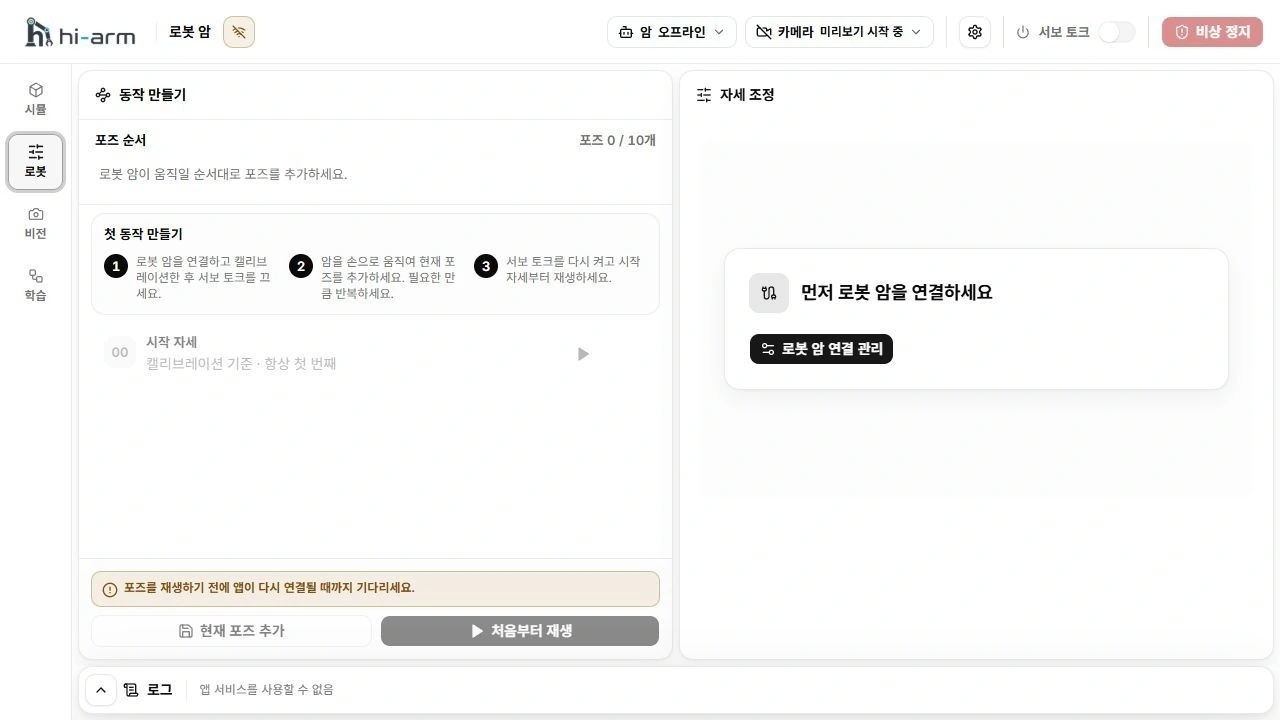
Arm workspace for recording and replaying poses
Record poses
- Support the arm against a sudden fall, then turn torque off.
- Slowly place it in the desired pose within the calibrated range.
- Wait until the pose is stable and the displayed current position settles.
- Select Add current pose. Record other needed poses in the same way.
Replay behavior
The list contains calibrated starting pose 00 and up to 10 recorded poses. You can record a pose only when all servo torque is off and the measured positions are stable.
Replay from start first returns automatically to the calibrated starting position, then visits recorded poses in order. Check the entire return path before selecting Return to start and replay. Manual joint control is unavailable while replay controls the arm. After a normal stop or completion, the follower can still hold its pose with torque on in Manual control. A replay error does not prove torque is off either; follow the displayed state and stop procedure.
Replay from the beginning
- Clear the path between the starting pose and the stored poses.
- Check follower readiness and enable torque.
- Select Replay from start, confirm Return to start and replay, and continue watching motion and warnings.
- After replay ends, support the arm and turn torque off.
The arm can fall when torque is switched off. A normal stop can leave torque on. Support the arm before turning torque off.
Do not reuse poses from another profile. Check poses together with the calibration used when they were recorded.