Vision task
The color camera detects cubes or faces. The follower can move to center a selected target in the image. First check Safety and follower readiness.
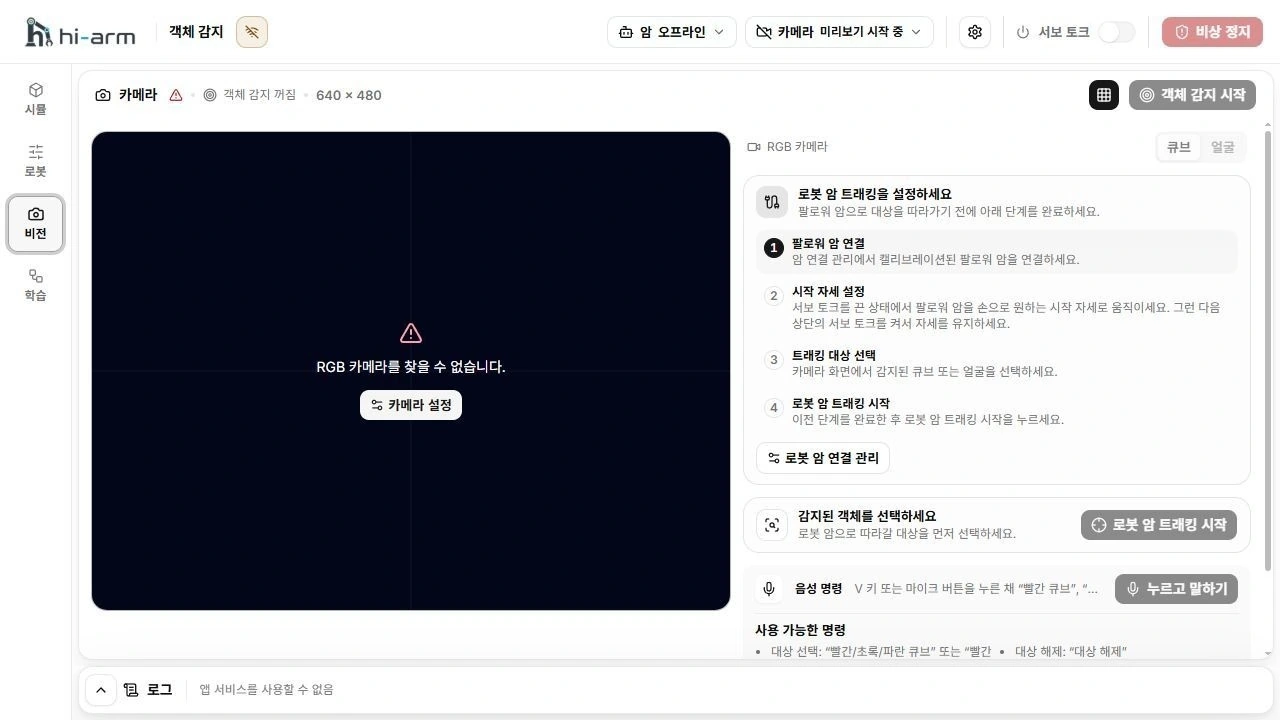
Camera view on the left and robot-arm tracking setup on the right
Camera selection and detection behavior
Use the product's Innomaker U20CAM-720P color camera. Windows can also label it USB Camera. Do not substitute a laptop or depth camera. Check the selected camera's image and connection status. After reconnecting USB, check the connection again.
When you open Vision, object detection can start once automatically when the camera image is live and detection is idle. Object detection and arm following are separate actions. Detection does not restart automatically after you stop it.
Select targets from the current frame. Objects of the same color are numbered from left to right. A number does not always refer to the same object. Check tracking state if the target disappears or multiple faces make the target ambiguous. After you change the detector, clear a target, or stop normally, the follower can still hold its pose with torque on.
If camera cleanup fails, safely stop robot motion. Select Retry cleanup if it is available and wait for confirmation. If cleanup still fails or the app asks you to restart, safely shut down the robot, quit the app completely, and reopen it before using the camera again. Arm following does not restart automatically. If torque state is uncertain, cut physical power before approaching the robot.
Prepare the camera
- Connect the color camera's USB cable and open the header Camera menu. The device list refreshes when the panel opens.
- Select the camera in the visible Device list. If it is not already connected, select Connect and wait for the image.
- Check image orientation, focus, lighting, and cable slack.
- If detection is idle, select Start detection and check the detection boxes.
No RGB cameras means no supported camera was found. This is an empty device state, not a connection failure. After attaching the camera, close and reopen the panel to refresh the list, then connect it. If the list cannot refresh, close and reopen the panel to retry. A newly attached camera does not connect automatically.
Detection modes
Cube mode finds red, green, and blue cubes. Face mode finds face positions only; it does not identify people. Do not use face detection as a safety function to prevent collisions with people.
Start tracking
- Check follower connection and calibration.
- Prepare a safe starting pose and enable torque.
- Start object detection.
- Select a target in the camera image.
- Select Start arm tracking.
Ending tracking does not release torque. If the follower holds its current pose after tracking ends, support it and turn off header Servo torque yourself. Do not approach the robot based only on the camera image.